

Exercise Notebook 1 - Operators and variables#
You can download this notebook and the additional files by clicking the download button() in the top right and selecting “Exercise notebook”.
1.1 Python Variables#
my_taxes variable. Use the my_income and tax_rate variables for that.my_income = 100
tax_rate = 0.1
my_taxes = ...
print(my_taxes)
Use the cell block below to find out what is the type of the variable my_taxes
# use this line to check the type of the variable my_taxes
...
Exercise 1.1.2
What is the type of the result of the expression \(3 + 1.5 + 4?\)
Assign the type to the variable beneath (e.g. if you think it is an integer then expression_type = int)
expression_type = ...
'w' of the sentence 'Hello world!' using indexing of the variable sentence. sentence = 'Hello world!'
letter_w = ...
print(letter_w)
In the following exercise you will be using a piece of code, which was written by other people. It can contain concepts you haven’t encountered yet but you will have to make it work! You need to practice with using code you don’t understand completely, as you want to be able to use programs written by other people.
In order to approach the problem, start from the point of error. If your error cannot be solved there, work your way backwards through the code. Try to understand the parts that are necessary to fix your problem, and avoid changing parts you know that work.
There are 2 types of numbers in Python: integer numbers and floating point numbers. Both have overlapping and different applications. For example, counting rocks will require only integers (1 rock, 2 rocks, 3 rocks, etc), while their weight can be expressed in both int and float (depending on the required accuracy).
Beneath you can see a small dataset of the measured daily temperatures and a filter function, which is used to remove incorrect measurements. Just run the cell, you don't have to change anything there and it is not important to understand it completely for now.
temp_data = [12.0, 13.5, 11.0, 12.7, 67.5, 11.8] # temperature measurements in Delft, in Celsius

# A function to remove erroneous measurements
def filter_errors(data, error_id):
    print('Data before filtering', data)

    del temp_data[error_id - 1] # deleting the erroneous measurement

    print('Data after filtering', data)
Your task is to fix it and remove the error! Go back to the previous cell. Try to find the error and correct it. Now run the cell below again and see if you get the desired result.
error_id = 4 # index of erroneous measurement

filter_errors(temp_data, error_id)
(Searching) Exercise 1.1.5
There are also other data types in Python, which were not mentioned in this part (in case they are not as useful or will be introduced later). For instance, Complex is one of them. The sad truth is that every software developer searches the web a lot. It’s not because she/he is lazy or incompetent. It is because programming languages are constantly updated and some tools are limited to a narrow field of applications. It is impractical to learn everything at once, therefore every coder has learned how to look up the functionality their task requires. Therefore, it is crucial for you to learn how to search as well. Complex type is used in Python to represent complex numbers. If you haven’t heard about them — a complex number is a number, which has a real and an imaginary part. For example, \(x = 17 + 5i\). Here, \(x\) is a complex number with a real part of \(17\) and an imaginary part of \(5\).
Your task is to create a variable my_complex_num of Complex type and assign a \(3 + 2i\) value to it. For that you will have to Google a bit. Try to look for something like “Python complex variables”. Python is very popular and you will be able to find everything you need. Make sure to filter the information you need — not everything you will find will be useful for this simple exercise.
my_complex_var = ...

print(my_complex_var)
1.2 Python Operators#
Exercise 1.2.1
Given that we have a rectangle with a height of \(3\) cm, width of \(5\) cm and a cutout circle of radius \(0.6\) cm, as shown below.
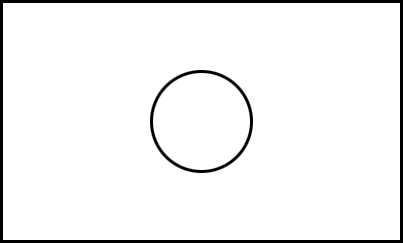
What will the remainder area of the rectangle be? Hint: \(A_{circle} = \pi r^2\)
# variables for the rectangle
rect_h = ...
rect_w = ...

# variables for the circle
pi = 3.14159265359
r = ...

# calculating area
circle_area = ...
rect_area = ...
remaining_area = ...

print('The remaining area is', remaining_area, 'cm^2')
Suppose a group of \(5\) engineers ordered \(3\) pizzas with \(8\) slices each and want to share their meal equally. Your task is to calculate the amount of pizza slices each engineer will get and the amount of slices which will be left untouched. Use // and % operators.
pizza_slices = ...
grp_members = ...

slices_per_person = ...
left_over_slices = ...

print('Number of slices per person:', slices_per_person)
print('Number of slices left over:', left_over_slices)
Exercise 1.2.3
Assign any numbers to num_a and num_b variables in such a way that their comparison returns a True value.
num_a = ...
num_b = ...

comparison_result = num_a != num_b
print(comparison_result)
(Fixing) Exercise 1.2.4
Recall that Sentinel data titles are formatted as:
S1A_IW_SLC__1SDV_20181205T015821_20181205T015851_024884_02BD8C_8700 where each part means something, e.g., S1A means Sentinel-1A.
An engineer from the European Space Agency wrote a piece of code to figure out if the data she has belongs to the Satellite Sentinel-1; and, if it does, she would like to know the time of overpass… but for some reason she keeps getting an error. Could you maybe help her out?
import datetime
data = 'S1A_IW_SLC__1SDV_20220218T231336_20220218T231403_041974_04FFAC_A40F'

platform_name = data[0:3]#selecting platform name
print('Platform name:', platform_name)

is_platform_name_correct = platform_name = 'S1A'#checking platform

if is_platform_name_correct == True:
    date = data[17:32]
    print('Sentinel-1 overpass at {}'.format(datetime.datetime.strptime(date, "%Y%m%dT%H%M%S")))
else:
    print('Data is not from Sentinel-1 and will not be processed')
(Searching) Exercise 1.2.5
In Python, there are a lot of shortcuts! There are multiple ways to solve tasks (e.g. reading data, filtering noise, solving systems of equations, etc) and there is, usually, a way to write a “one-liner”. A “one-liner” is a code, which solves the task in one line. Sometimes “one-liners” are not preferred (it usually lowers the readability of your code) but it is still useful to think about them. Think about ”How can I solve this problem differently?”, or ”How can I use Python most efficiently?”.
For example, in the cell bellow you can see a small combination of comparison operators.
my_number = 5
result = 3 < my_number and my_number < 6
print(f'My number {my_number} is within (3, 6) range:', result)
This expression checks whether: first, my_number is bigger than \(3\) and then, secondly, whether my_number is smaller than \(6\). If the first check resulted in True, the second check starts. If the second check also returns True, then the result is True as well. Mathematically speaking we check whether a number lies in the \((3, 6)\) range. In Python, there is a way to make these expressions shorter. They are called “chained comparison”. Your task is to rewrite the cell above with that technique.
# use this line to create a chained comparison
...